
Guides for your property
How to increase visibility on Booking

The Search Results Score is based on how often your property appears in search results compared to other properties in your city. Your score works like the ranking system, so the lower the number, the more visible your property is.
Booking.com provides a page within its extranet under “Analytics” -> “Dashboard ranking”
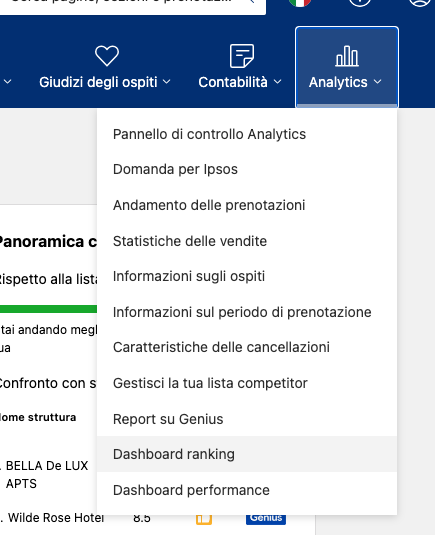
The information needed to gain greater visibility
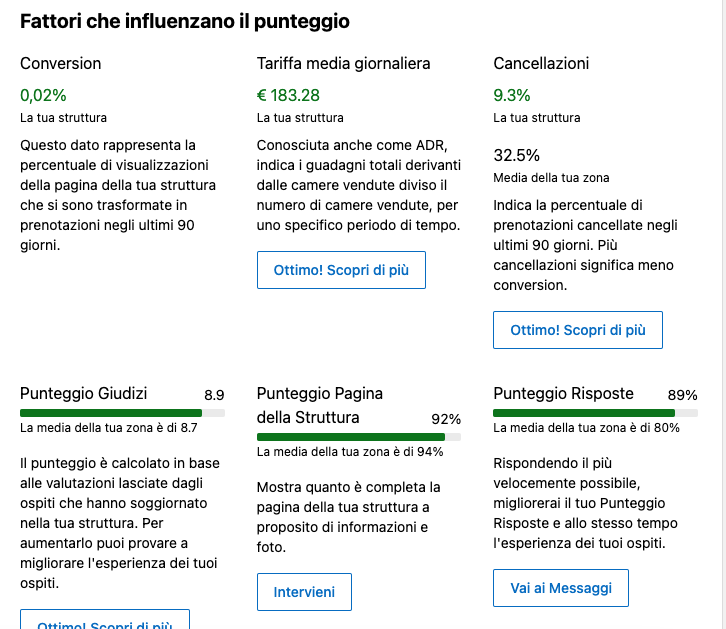
Factors affecting the score
Conversion
This figure represents the percentage of views of your property's page that turned into bookings over the last 90 days.
Average daily rate
Also known as ADR, it indicates total earnings from rooms sold divided by the number of rooms sold, over a specific period.
Local average
Indicates the percentage of bookings cancelled in the last 90 days. More cancellations mean lower conversion.
Review score
The score is calculated based on reviews left by guests who stayed at your property. To increase it, try improving your guests’ experience.
Property page score
Shows how complete your property page is in terms of information and photos.
Response score
By responding as quickly as possible, you will improve your Response Score and enhance your guests’ experience at the same time.